13. Interactivity API: Rate a Movie
The Interactivity API replaces ad-hoc frontend JavaScript with a declarative system. Instead of querySelector and event listeners, you use data-wp-* directives that connect HTML to a reactive store. The block renders meaningful HTML on the server, and the API enhances it on the client.
This lesson walks through the tenup/rate-movie block: a fully interactive star rating widget built entirely with the Interactivity API.
Learning Outcomes
- Understand the Interactivity API: stores, state, actions, callbacks, and
data-wp-*directives. - Know how to wire a
view-module.jsto a block viablock.json. - Be able to build interactive UI with proper accessibility.
- Understand progressive enhancement: the block should be meaningful without JS.
- Know the
do_blocks()pattern for rendering block markup from PHP.
To sync your theme with the finished product:
1. Copy the block:
cp -r themes/fueled-movies/blocks/rate-movie themes/10up-block-theme/blocks/rate-movie
2. Add two new dependencies. In your theme's package.json, add @wordpress/dependency-extraction-webpack-plugin and @wordpress/interactivity to dependencies:
"dependencies": {
    "@10up/block-components": "^1.19.4",
    "@wordpress/dependency-extraction-webpack-plugin": "^5.9.0",
    "@wordpress/interactivity": "^6.38.0",
    "10up-toolkit": "^6.5.0",
    "clsx": "^2.1.1"
}
Two new packages here:
@wordpress/dependency-extraction-webpack-plugintells webpack to externalize@wordpress/*packages so they use WordPress's built-in copies instead of being bundled.@wordpress/interactivityis the Interactivity API runtime that yourview-module.jsimports from.
The scaffold already has "useScriptModules": true in the 10up-toolkit config, which is required for the Interactivity API's viewScriptModule to work.
3. Install and build:
npm install && npm run build
Tasks
1. Copy the block from the answer key
Copy the block and install the dependency as described above, then rebuild.
2. Review block.json
{
    "name": "tenup/rate-movie",
    "title": "Rate Movie",
    "supports": {
        "html": false,
        "interactivity": {
            "interactive": true,
            "clientNavigation": true
        }
    },
    "render": "file:./render.php",
    "editorScript": "file:./index.js",
    "viewScriptModule": "file:./view-module.js",
    "style": "file:./style.css"
}
Key entries:
viewScriptModule: points to the Interactivity API store. WordPress loads this as an ES module only on the frontend, only when the block is present.supports.interactivity: enables the Interactivity API for this block.clientNavigation: trueallows the store to persist across client-side navigations.
3. Walk through the server-rendered markup
The render.php file outputs HTML with data-wp-* directives:
<?php
$block_wrapper_attributes = get_block_wrapper_attributes( [
    'data-wp-context'     => wp_json_encode( [ 'rating' => null ] ),
    'data-wp-interactive' => 'tenup/rate-movie',
] );
?>

<div <?php echo $block_wrapper_attributes; ?>>

    <!-- Trigger button -->
    <button
        aria-controls="rate-movie-popover"
        aria-haspopup="true"
        class="wp-block-tenup-rate-movie__trigger"
        data-wp-bind--aria-expanded="state.isPopoverOpen"
        data-wp-text="state.buttonText"
        popovertarget="rate-movie-popover"
        type="button"
    >Rate</button>

    <!-- Popover dialog -->
    <div
        aria-labelledby="rate-movie-popover-label"
        aria-modal="true"
        class="wp-block-tenup-rate-movie__popover"
        data-wp-class--is-open="state.isPopoverOpen"
        data-wp-init="callbacks.initPopover"
        id="rate-movie-popover"
        popover
        role="dialog"
    >
        <!-- Range slider -->
        <label>
            <span class="visually-hidden">Rate this movie from 1 to 10</span>
            <input
                data-wp-bind--value="state.sliderValue"
                data-wp-on--input="actions.selectRating"
                max="10" min="1" step="1"
                type="range"
            />
        </label>

        <!-- Rating display -->
        <span data-wp-text="state.popupRatingText"></span>

        <!-- Clear button -->
        <button
            data-wp-class--is-hidden="!state.hasRating"
            data-wp-on--click="actions.clearRating"
            type="button"
        >Clear</button>
    </div>
</div>
Directive reference
| Directive | What it does | Example |
|---|---|---|
data-wp-interactive | Declares which store this block uses | "tenup/rate-movie" |
data-wp-context | Sets initial reactive context for this block instance | { "rating": null } |
data-wp-text | Replaces text content with a state value | state.buttonText |
data-wp-bind--{attr} | Binds an HTML attribute to state | data-wp-bind--aria-expanded="state.isPopoverOpen" |
data-wp-on--{event} | Attaches an event handler to an action | data-wp-on--click="actions.clearRating" |
data-wp-class--{name} | Toggles a CSS class based on state | data-wp-class--is-open="state.isPopoverOpen" |
data-wp-init | Runs a callback when the element enters the DOM | callbacks.initPopover |
The do_blocks() pattern
The render.php uses do_blocks() to render Button blocks from PHP. This ensures the buttons get proper block-style-variation CSS applied. This approach would also load any other code split block assets such as view-module.js for interactivity.
$trigger_button = '
<!-- wp:button {"tagName":"button"} -->
<div class="wp-block-button">
    <button class="wp-block-button__link wp-element-button"
        data-wp-bind--aria-expanded="state.isPopoverOpen"
        data-wp-text="state.buttonText"
        popovertarget="rate-movie-popover"
        type="button"
    >Rate</button>
</div>
<!-- /wp:button -->
';

echo do_blocks( $trigger_button );
By wrapping the HTML in block comments and running it through do_blocks(), WordPress processes it as if it were a real block, applying any style variation CSS that's been registered. This is how the "is-style-secondary" variation on the Clear button gets its styling even though the button is defined in PHP.
4. Walk through the store
// store() creates a reactive store scoped to the 'tenup/rate-movie' namespace.
// State is reactive: when values change, any directives referencing them re-render.
// Context (getContext()) is per-block-instance data set via data-wp-context in the markup.
import { store, getContext, getElement } from '@wordpress/interactivity';

const { state } = store('tenup/rate-movie', {
    // Reactive state shared across all instances of this block.
    state: {
        // Tracks whether the popover is currently open.
        isPopoverOpen: false,

        // Derived state (getter): true when the user has set a rating.
        get hasRating() {
            const context = getContext();
            return context.rating !== null && context.rating > 0;
        },

        // Derived state: shows "Rate" or "7/10" depending on rating and popover state.
        get buttonText() {
            if (state.isPopoverOpen) return 'Rate';
            const context = getContext();
            return context.rating > 0 ? `${context.rating}/10` : 'Rate';
        },

        // Derived state: the range slider's current value (defaults to 1 if no rating).
        get sliderValue() {
            const context = getContext();
            return context.rating !== null ? context.rating : 1;
        },
    },

    // Actions are event handlers triggered by data-wp-on--{event} directives.
    actions: {
        // Sets the rating from the range slider input event.
        selectRating(event) {
            const context = getContext();
            const value = parseInt(event.target.value, 10);
            context.rating = value >= 1 && value <= 10 ? value : null;
        },

        // Resets the rating to null (triggered by the "Clear" button).
        clearRating() {
            getContext().rating = null;
        },
    },

    // Callbacks run in response to lifecycle events like data-wp-init.
    callbacks: {
        // Syncs the popover's open/close state with the reactive store.
        // Uses the native Popover API's toggle event to detect state changes.
        initPopover() {
            const { ref } = getElement();
            if (!ref) return;

            // data-wp-init is on the popover element, so we walk up to find
            // the block wrapper and then locate the trigger button sibling.
            const root = ref.closest('.wp-block-tenup-rate-movie') ?? ref.parentElement;
            const popover = ref;
            const button = root?.querySelector('.wp-block-tenup-rate-movie__trigger');

            if (!popover || !button) return;

            // Listen for the native popover toggle event and sync to reactive state.
            const updateState = () => {
                state.isPopoverOpen = popover.matches(':popover-open');
                button.setAttribute('aria-expanded', state.isPopoverOpen ? 'true' : 'false');
            };

            popover.addEventListener('toggle', updateState);
            updateState();
        },
    },
});
Key concepts:
store(): creates a reactive store namespaced to'tenup/rate-movie'. The namespace must match thedata-wp-interactiveattribute in the markup.getContext(): returns the reactive context for the current block instance. Each rate-movie block on the page has its ownratingvalue.- Computed state:
getproperties likebuttonTextare derived from context. They recompute automatically when their dependencies change. - Actions: functions called by
data-wp-on--*directives.selectRatingreads the slider value and updates context. - Callbacks: functions called by
data-wp-init(on mount) ordata-wp-watch(on change).initPopoversets up the native popover toggle listener.
Interaction flow
- User clicks the "Rate" button, the native
popoverAPI opens the dialog initPopovercallback fires on thetoggleevent, setsstate.isPopoverOpen = truedata-wp-bind--aria-expandedupdates the button's ARIA attribute- User drags the range slider,
data-wp-on--inputfiresactions.selectRating selectRatingparses the value and setscontext.ratingdata-wp-text="state.buttonText"reactively updates to show"7/10"- User clicks "Clear",
actions.clearRatingsetscontext.rating = null - Button text reverts to "Rate"
5. Add to the single movie template
Revisit templates/single-tenup-movie.html in the Site Editor. Add <!-- wp:tenup/rate-movie /--> in the movie header area (near the title and metadata row).
Export the updated markup back to the theme file.
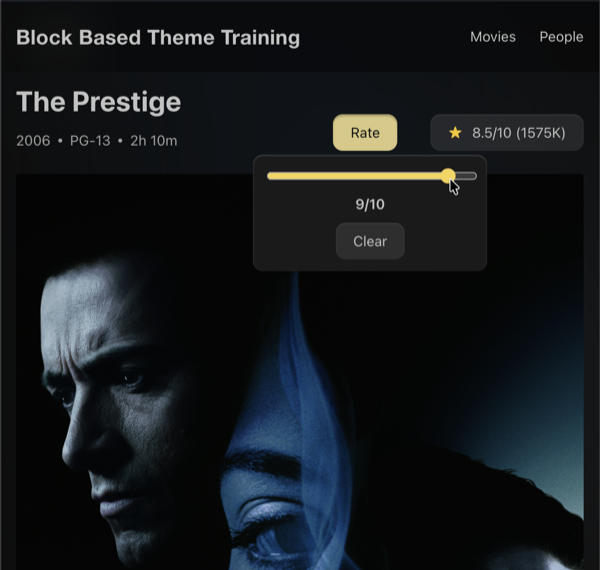
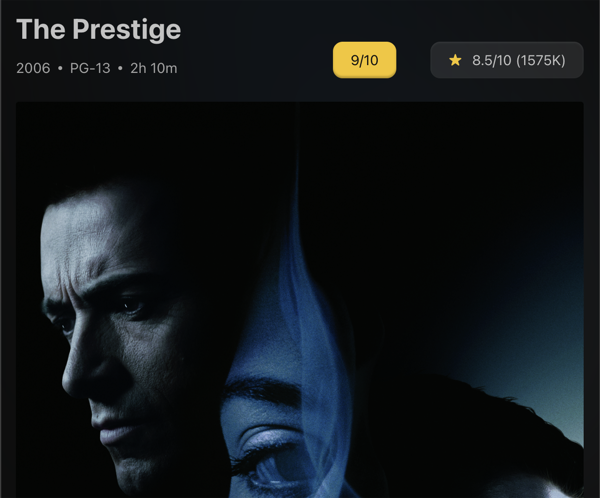 Our Movie Rating button demonstrating the popover js and updated text
As a bonus, see if you can add local storage to a movie's rating so the values persist across page loads.
The Interactivity API is not a replacement for React. It's designed for server-rendered blocks that need client-side behavior. Editor-side interactivity still lives in edit.js.
Files changed in this lesson
| File | Change type | What changes |
|---|---|---|
package.json | Modified | Added @wordpress/interactivity dependency; useScriptModules: true in toolkit config |
blocks/rate-movie/block.json | New | Interactive block metadata with viewScriptModule |
blocks/rate-movie/render.php | New | Server-rendered HTML with data-wp-* directives, do_blocks() pattern for buttons |
blocks/rate-movie/view-module.js | New | Interactivity API store with state, actions, callbacks |
blocks/rate-movie/index.js | New | Minimal editor registration |
blocks/rate-movie/style.css | New | Popover, trigger, slider, and rating display styles |
templates/single-tenup-movie.html | Revisited | Added <!-- wp:tenup/rate-movie /--> in movie header area |
Ship it checkpoint
- The block uses a view module with store state/actions (no console errors)
- Accessibility: popover labeling,
aria-expanded, keyboard navigation all work - State rules enforced (null initial, range 1-10, clear resets to null)
- Rating displays on the button after selection ("7/10")
Takeaways
- The Interactivity API adds frontend behavior to server-rendered blocks declaratively.
- Directives (
data-wp-on--click,data-wp-bind--*,data-wp-text) connect HTML to store state. - Always server-render the initial HTML in
render.php. The API enhances it, not replaces it. - Each block instance has its own context via
data-wp-contextandgetContext(). - Computed state (
getproperties) automatically update when dependencies change. - Accessibility is not optional: ARIA attributes, keyboard support, screen reader testing.
- Use
do_blocks()when outputting block markup from PHP to ensure style variations are applied.